Transforming scanned documents or images as text-searchable PDF files is important for further processing of these documents. To make PDFs searchable, the technology used is optical character recognition - OCR. For businesses and enterprises, there might be a large number of documents to be processed. This calls for the automation of PDF OCR.
PDF4me provides high-quality PDF OCR that produces one of the most accurate text recognition. But when you have hundreds of scanned documents that need to be recognized the only solution would be automation. PDF4me Workflows has the right action to execute this automation - the PDF OCR.
How to automate PDF OCR using Workflows
Create searchable PDF files from scanned documents or images with text. The action enables you to search or copy text from the output PDF.
Let us look at a sample workflow with the PDF OCR action. Begin with selecting the Create Workflow from the Workflows Dashboard.

Add a trigger for the Workflow
Create and configure a trigger to kick off the Workflow automation. As soon as a new file arrives in the configured folder in the trigger the automation is initialized.
Let's use the Google Drive trigger for the example.

Add the PDF OCR action
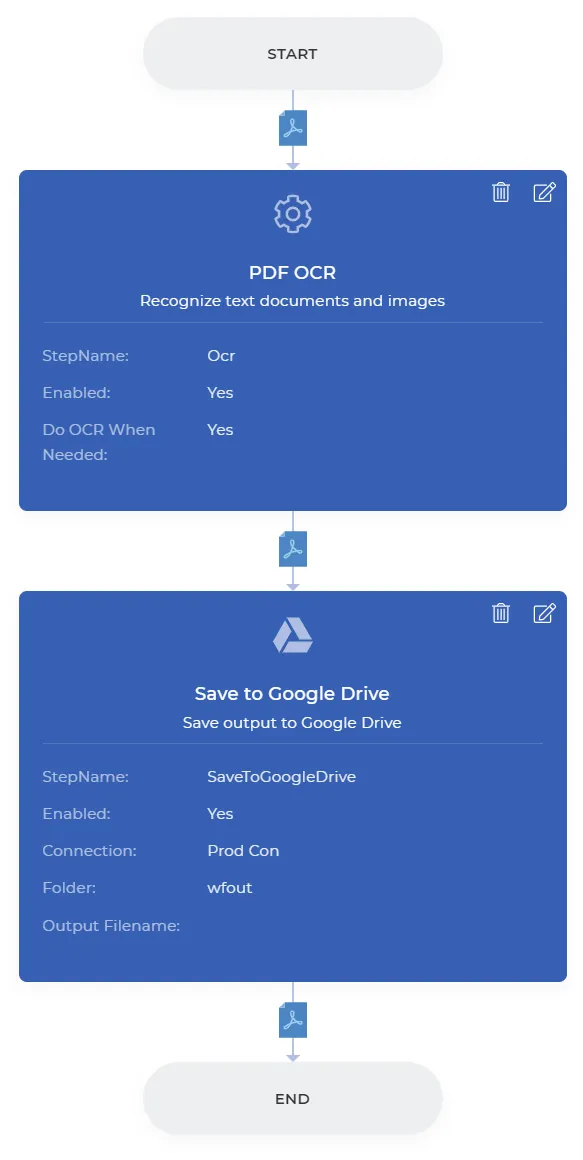
Add the ODF OCR action and enable the Do OCR When needed to make sure the OCR is only used if required saving unnecessary calls.

Add Save to Storage
Add the action for saving the output files. We can choose Save to Google Drive for the example. Configure the folder where you want your processed files to be saved.
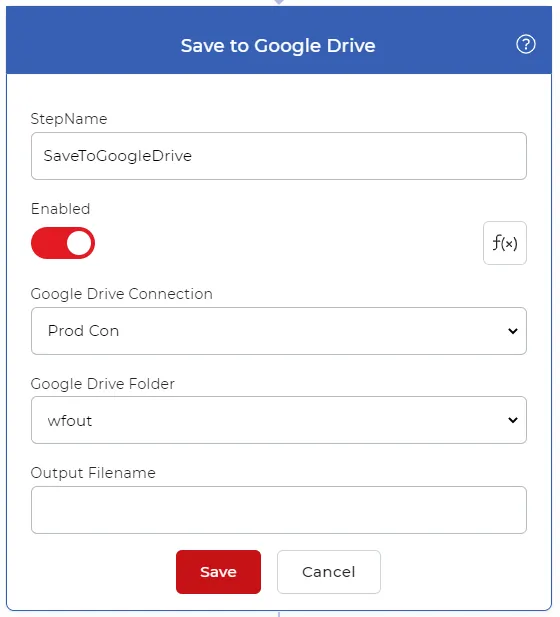
Once the configurations are complete, you can Save to Publish the Workflow. A sample Workflow will look like below.