Compliant e-invoices, generated in one step.
Turn your invoice data into a ZUGFeRD hybrid e-invoice, one PDF/A-3 file with the structured XML embedded inside, ready for Germany's B2B mandate and any EN 16931 ERP.
Create ZUGFeRD invoices on every platform.
Add Create ZUGFeRD Invoice as a native no-code action, or call the same operation from the REST API. Build it once, then run it everywhere.




One file humans and machines both read.
ZUGFeRD is the German hybrid e-invoice: an archival PDF with structured invoice XML attached inside it. PDF4me builds it from your data.
One hybrid file
A single PDF/A-3 archival PDF with the structured invoice XML embedded inside. People read the PDF; ERPs and clearing platforms parse the XML.
EN 16931 & Factur-X aligned
ZUGFeRD 2.0+ follows the EN 16931 European standard and shares its hybrid structure with France's Factur-X, so one output works across borders.
Ready for the German mandate
Germany's Growth Opportunities Act made B2B e-invoice receipt mandatory from 1 January 2025, with full sending phased in by 2028. ZUGFeRD 2.0+ satisfies it.
Five fields to a compliant invoice.
- Add the action or call the API. Use the Create ZUGFeRD Invoice action in Power Automate, Make, n8n or Zapier, or the same operation on the REST API.
- Pick version and input format. Choose your ZUGFeRD version and data shape from the combined dropdown, for example 2.0-XML, 2.0-JSON or 2.0-CSV.
- Choose output and conformance.
XmlWithPdffor the hybrid PDF/A-3, orXmlOnlyfor the XML alone. Set BASIC, COMFORT or EXTENDED. - Map your invoice data. Point the matching XML / JSON / CSV field at your data; for the hybrid output, also map a background PDF and file name.
- Route the compliant file. Send the result to your archive, your ERP, or your customer, in the same flow.
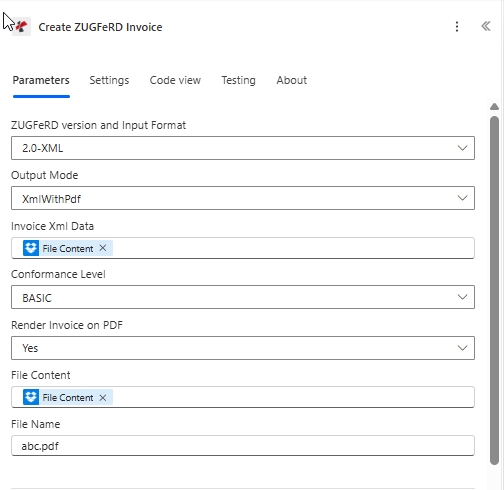
The Create ZUGFeRD Invoice action in Power Automate.
Start at BASIC, grow into EXTENDED.
Pick the profile your buyer or ERP supports. Start with BASIC for the widest compatibility, then move up only once support is confirmed.
BASIC
The entry-level profile with the minimum line-item and tax breakdown. Broadest receiver compatibility, best for first tests.
Level 1 of 3COMFORT
Adds structured fields for richer invoice content, on top of the EN 16931 baseline.
Level 2 of 3EXTENDED
The largest field set, for industry-specific scenarios beyond the standard baseline.
Level 3 of 3ZUGFeRD, Factur-X or XRechnung?
Three names, one family. Use ZUGFeRD for general B2B, Factur-X across the French border, and XRechnung for the German public sector.
ZUGFeRD
The German hybrid format: PDF/A-3 with embedded XML. Use it, EN 16931-aligned, for general B2B invoicing.
Factur-X
France's sister format. Same hybrid PDF/A-3 + XML structure as ZUGFeRD 2.x, and fully compatible with it.
XRechnung
The German public-sector profile: a stricter, pure-XML format for billing federal, state and municipal authorities.
Get your documents done.
Build it into your product with the API, automate it with no code, or use the free tools in your browser. No credit card to begin.
curl -X POST https://api.pdf4me.com/v2/ConvertToPdfFree tier · No credit card required